
Comments on https://lichess.org/@/thibault/blog/the-opening-explorer-now-requires-authentication/FSWh9Zg3
Comments on https://lichess.org/@/thibault/blog/the-opening-explorer-now-requires-authentication/FSWh9Zg3
Comments on https://lichess.org/@/thibault/blog/the-opening-explorer-now-requires-authentication/FSWh9Zg3
Very good, well done!
You guys are really great!
You are spoiling us. You’re showing the world how things can be done. Major kudos!
Thanks for fixing the problems!
Yet another reason why Lichess is the best. Thank you for fighting for your users’ experience and for the transparency.
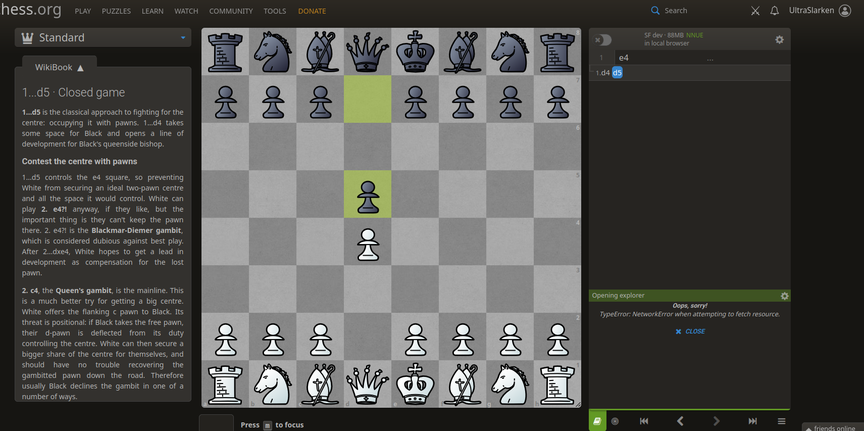
For the last 2 days, I have been unable to use the Opening Explorer reliably. I am always authenticated, and have been persistently seeing the error:
Oops, sorry!
TypeError: NetworkError when attempting to fetch resource.
Is this related? How can I resolve this?
All the other resources (playing games, puzzles, viewing public studies, etc.) are working for me. Only the Opening Explorer has been broken. Screenshot shows I am authenticated.
I don't know. Everything is working for me!
@UltraSlarken Your browser is using a stale cache. Perform a hard refresh (Ctrl/Cmd+Shift+r) or clear site data and try again.
@ItsGam3Tyme said ^
@UltraSlarken Your browser is using a stale cache. Perform a hard refresh (Ctrl/Cmd+Shift+r) or clear site data and try again.
After I cleared all history, cache, site settings, everything, then logged out and back in, the Opening Explorer is working for me again. Thank you.
vive lichess.org


