
Screenshot
I wanted Lichess puzzles — but my way. So I built it.
I love Lichess puzzles — but I always wanted more control over my training. So I built a free, customizable tactics trainer with Lichess puzzles. Here's what it does.§1 — The Problem
I've always enjoyed online tactics. Puzzle Storm is fun, Puzzle Streak is challenging. But at some point I started noticing that I wanted something a little different.
I wanted to skip the first puzzles in Puzzle Storm — they are far too easy. I wanted to set a different time limit, and control how many mistakes are allowed — or have no limit at all. I wanted to train only on specific motifs, combine them freely, and play through them in a time mode of my choosing. In short: I wanted to combine all these settings and make my training truly my own — more focused, more effective, and more fun.
Lichess puzzles are excellent. But they offer little control over how a session is structured — and that's exactly what I kept missing.
So I built something.
§2 — What I Built
Personal Puzzles is a free puzzle trainer built around one idea: no fixed settings, no artificial limitations — just your puzzle session, the way you want it. The puzzles come from the Lichess database — 50,000 of them, selected by quality.
The result is a web app that runs in any browser. You can try it now at guidogoessling.github.io/personal-puzzles or on my club's site at bielefeldersk.de/personalpuzzles. The source code is on GitHub.
The name says it all: everything is personal.
§3 — Train Your Way
This is where Personal Puzzles differs. Before a session starts, you choose how it works — not just one mode, but the full structure of your training session.
The most important settings: your starting rating and how fast it increases, your time limit, and how many mistakes you allow yourself. Want a calm unlimited session to explore endgame motifs? Done. Want a fast round that starts easy and climbs fast? Also done.
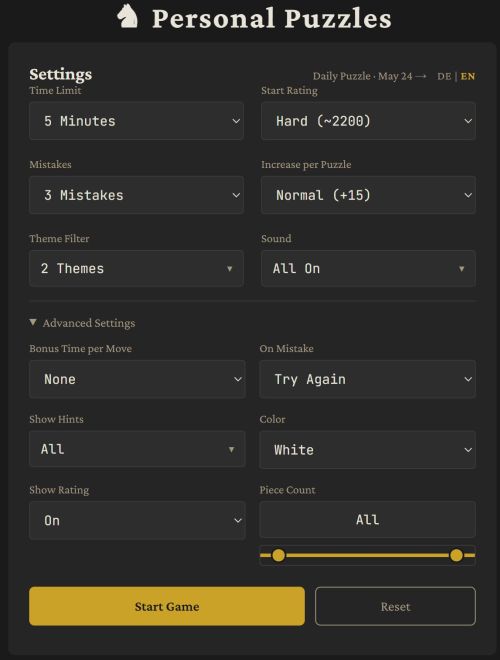
| Setting | Options |
|---|---|
| Time limit | 1 / 3 / 5 / 10 min / Unlimited / Custom |
| Starting rating | 600 – 3000 / Custom |
| Rating increase | None / +10 / +15 / +25 / +50 per puzzle / Custom |
| Max mistakes | 1 / 3 / 5 / Unlimited / Custom |
| Bonus time | 0 / 1 / 2 / 3 / 5 s per correct move |
| On mistake | Try again / Next Puzzle |
| Color | Mixed / White / Black / Random |
| Piece count | Dual range slider (3–32 pieces on the board) |
| Hints | Motif / Piece / All / None |
| Show rating | On / Off |
| Language | English / German |
Most main settings have a 'Custom' option — so you're never stuck with the presets. Your settings are saved automatically and restored the next time you open the app.
A concrete example: I often train with 5 minutes, starting at 1800, an increase of +25 per puzzle, and a maximum of 3 mistakes. That gives me a session with a clear end, a real challenge, and just enough pressure to stay focused.
One thing you'll notice: there's no persistent rating. With so many settings, a single rating number would be meaningless anyway — but there's a second reason. As a coach I've heard 'I'm not doing puzzles right now, I don't want to ruin my rating' more often than I'd like. Extrinsic motivation is a double-edged sword. Personal Puzzles does give you a performance rating after each session — an Elo-based score that accounts for puzzle difficulty, time spent, and hints used. Useful for comparing your own sessions, without the pressure of a number that follows you around.
§4 — The Theme Filter
The theme filter turns Personal Puzzles into a proper training tool — not just a puzzle stream, but a targeted session on exactly the motifs you want to work on.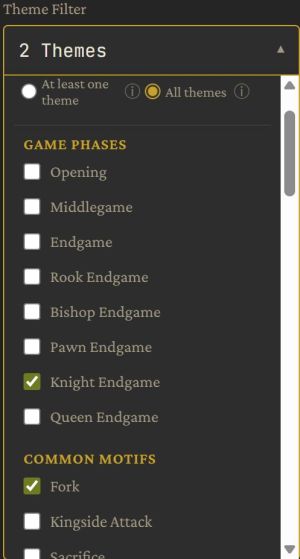
There are 74 themes organized in categories like Game Phases, Tactical Motifs, Checkmate Goals, Checkmate Patterns, and more. You can train these themes in any time format.
In Personal Puzzles you can not only select a theme, you can select any combination of themes — and here's where it gets interesting: you choose the logic.
OR logic (At least one theme) means any puzzle containing at least one of them will appear. AND logic (All themes) means every puzzle must contain all selected motifs.
Want to practice mates in 2 and mates in 3 together? OR. Want to study sacrifices in rook endgames? AND. The AND logic in particular opens up endless training possibilities.
All themes can be combined with a filter for the number of pieces on the board.
The tactical motifs are sorted by their frequency in the Lichess puzzle database — so you always know how common or rare a motif actually is.
I also reworked the mate themes. It might be interesting from a chess culture standpoint to know the difference between a "Pillsbury's mate" and an "Opera mate" — but in the end, both are mates with a rook and bishop. Personal Puzzles doesn't use historic names for checkmate patterns. Instead it describes which pieces deliver the mate — in my opinion far more useful for learning.
I haven't found a comparable level of filter control on any other platform. — it's the feature most useful for players and coaches.
§5 — Review
Solving puzzles is one thing. Learning from them is another. The review mode in Personal Puzzles is designed to make that second step as useful as possible.
After a session, all solved puzzles appear in a grid — one card per puzzle, shown from your perspective. You can filter by result (correct / incorrect) and sort by puzzle number, rating, time spent, or number of attempts. The puzzles you struggled with are easy to find.
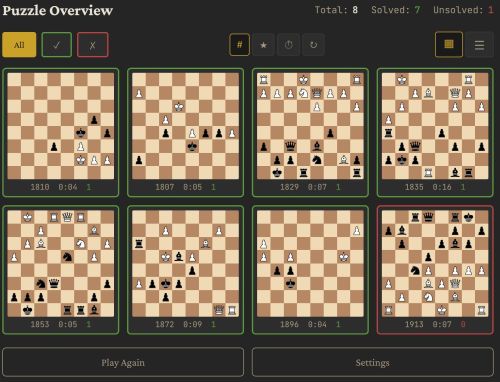
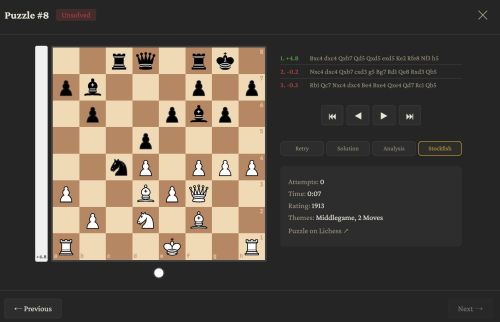
Each puzzle can be opened for a closer look. You can try to solve it again, step through the solution move by move, analyze the position freely on the board or use Stockfish.
§6 — Sound
One idea I had long before Personal Puzzles existed: what if chess moves sounded different depending on what was happening on the board?
Not just the same sound for every move — but a sound that adapts. A pawn sounds lighter and higher than a queen. A move across the whole board sounds longer than a one-square step. A capture has its own character. A knight move — well, a knight doesn't slide, it jumps.
Personal Puzzles has a sound engine built around this idea. It uses real recorded wood samples as a base, then adapts them: pitch and volume vary by piece weight, duration varies by move distance — like in a game with real wooden pieces.
§7 — For your use
Personal Puzzles has no login, no account, and no registration. It can be used online, but it is a single HTML file — it can be saved locally and used completely offline. Your club can host it on their website, or simply open it on a laptop at the training table. No internet connection required during the session.
If you want to use your own puzzles, that is also possible. Positions can be added by by editing the embedded puzzle list directly — useful if you want to work on specific positions.
The source code is available on GitHub under the MIT license — free to use, free to modify, free to share. Feedback and contributions are very welcome.
§8 — Things to improve
Personal Puzzles is a work in progress. There are features I'm happy with, but not everything is perfect.
The sound engine works — but it's an experiment.
On the visual side: board colors and piece sets are fixed for now.
If any of this sounds like something you'd like to help with — or if you have other ideas for improvements or new features — the project is open source and contributions are very welcome.
§9 — Thanks and Links
Personal Puzzles would not exist without Lichess. The puzzle database is CC0 — free for everyone to use, build on, and share. That openness made this project possible. Thank you to the whole Lichess team and community.
Try it, share it, or just let me know what you think.
▶ Play: guidogoessling.github.io/personal-puzzles
▶ Club site: bielefeldersk.de/personalpuzzles
▶ GitHub: github.com/guidogoessling/personal-puzzles
You may also like
 CM HanSchut
The Lichess Opening Puzzles with games makes them searchable from any position
Search from any opening position for Lichess Opening Puzzles CM HGabor
How titled players lie to you
This post is a word of warning for the average club player. As the chess world is becoming increasin… thibault