
Noobmasterplayer123
Neural Net Engine Database (NNEDB)
An API gateway to latest chess neural nets move probabilities, evals and more
Intro
Hey everyone. I'm back with a blog post about a problem that's been gnawing at me for a while, building chess tooling in the browser, and the solution I ended up shipping. In this blog, I will go over how I solved the latency issues related to running the latest chess neural nets on the browser. You can read my old blog about how I integrated those here, ways various clients can call this API and much more!
The Problem: Neural Nets in the Browser Are a Pain
If you've ever tried to run a chess neural network client-side, you know the drill. The usual approach is:
- Download the ONNX model weights (Maia models sit around 20–80 MB; Leela nets can be much larger)
- Spin up a Web Worker so inference doesn't freeze the main thread
- Load the ONNX Runtime WASM bundle (another hefty download)
- Wait for the worker to initialize, then post messages back and forth
On a fast connection with a warm cache, this is manageable. On a mobile device, a slow connection, or a first visit? It's brutal. Users are sitting there watching a spinner while 50+ MB of weights trickle in before they can see a single move probability. And if you want to support multiple networks, say. Leela T1-256 for engine-strength analysis and Maia 3 for human-likeness at different Elos, you're looking at multiple downloads and multiple workers.
The model loading latency alone can be 3–8 seconds, even on reasonable hardware. That's before a single forward pass runs.
There's also the maintenance side: ONNX Runtime WASM has its own quirks, worker message serialization adds boilerplate, and model file maintenance in the long term.
I wanted something better.
The Solution: NNEDB (Neural Net Engine Database)
NNEDB is a REST API that sits in front of the neural networks, so your app doesn't have to touch weights at all. You send a FEN. You get back move probabilities and position evaluations. That's it. No chess engines are being used to generate the responses; the name "engine" is used because it's computing mathematical formulas like HEE and lc0 centipawns at runtime. This server can be run locally, as NNEDB is open source, and the source code can be found here
Base URL:
https://www.chessagine.com/api/nn
Every request is a POST with Content-Type: application/json. The endpoint field in the body routes to the right network — there's no URL path switching.
Supported Nets
Three nets are available: Leela T1-256 ("leela"), a self-play neural net; Elite Leela ("elite-leela"), trained on 20M Lichess Elite games (2500–3000 Elo), which captures strong human patterns rather than pure engine play; and Maia 3 ("maia3"), which models human-like play at a specific rating and requires an additional rating field (any multiple of 100 between 600 and 2600).
The Database Part: How Caching Works
This is the part I find most interesting architecturally.
NNEDB isn't just a proxy for live inference. Every unique (FEN, engine, rating) combination that gets queried is stored permanently. On a cache miss, the server runs live neural net inference and writes the result. On all subsequent requests for the same position, the stored result comes back instantly, no inference needed.
This means:
- First caller of a position pays the inference cost (latency is a little higher on a miss, but still just an HTTP call, no client-side model loading).
- Every subsequent caller gets near-instant results.
- The database grows organically with community use. Every query you make contributes a result that benefits everyone who queries that same position afterward.
Opening positions and common middlegame positions will be warm in cache almost immediately. Your requests for certain FEN will benefit the future caller with faster response times.
Making a Request
Single position — Leela T1-256
POST https://www.chessagine.com/api/nn
Content-Type: application/json

{
  "endpoint": "analyze",
  "fen": "rnbqkbnr/pppppppp/8/8/4P3/8/PPPP1PPP/RNBQKBNR b KQkq e3 0 1",
  "engine": "leela"
}
Single position — Maia 3 at 1500 Elo
{
  "endpoint": "analyze",
  "fen": "rnbqkbnr/pppppppp/8/8/4P3/8/PPPP1PPP/RNBQKBNR b KQkq e3 0 1",
  "engine": "maia3",
  "rating": 1500
}
The rating field must be a multiple of 100 between 600 and 2600.
The Response Schema
{
  "success": true,
  "data": {
    "topMoves": [
      { "move": "c5", "probability": 0.418, "percentage": "42%" },
      { "move": "c6", "probability": 0.176, "percentage": "18%" },
      { "move": "e6", "probability": 0.109, "percentage": "11%" },
      { "move": "e5", "probability": 0.096, "percentage": "10%" },
      { "move": "d5", "probability": 0.074, "percentage": "8%"  }
    ],
    "uciEval": {
      "policy": {
        "c7c5": 0.418,
        "c7c6": 0.176,
        "e7e6": 0.109
      },
      "value": 0.425,
      "rawWdl": {
        "win":  0.256,
        "draw": 0.339,
        "loss": 0.405
      }
    },
    "HumanEstimateEval":     "-0.82",
    "LeelaZeroEstimateEval": "-0.47",
    "cacheHit": true,
    "_net": "leela"
  }
}
A few things worth noting:
topMovesgives you SAN moves with normalized probabilities — ready to display directly.uciEval.policyis the full policy vector over every legal move, keyed by UCI strings. Useful if you want to build your own visualizations.rawWdldecomposes win/draw/loss, which is much more informative than a raw centipawn number for positions with fortress or fortress-breaking potential.HumanEstimateEvalvsLeelaZeroEstimateEval:two different centipawn calibrations. The human estimate is calibrated based on my HEE formula, which I discussed in this blog. LeelaZeroEstimateEval uses lc0's WDL -> centipawn formula, which can be found in lc0's codebase
Batch Maia: All 21 Rating Levels at Once
There's a second endpoint specifically for Maia 3: batch-maia3. It analyzes a position across all 21 rating levels (600, 700, ... 2600) in a single request and returns results for every level in one response.
{
  "endpoint": "batch-maia3",
  "fen": "rnbqkbnr/pppppppp/8/8/4P3/8/PPPP1PPP/RNBQKBNR b KQkq e3 0 1"
}
The response contains an array of 21 entries, each with the full analysis for that rating tier. This is useful for things like "how does move preference shift from 800 to 2400"; you can render a heatmap or probability flow chart showing at which Elo a player stops playing e5 and starts playing c5 against e4. I find this data genuinely fascinating.
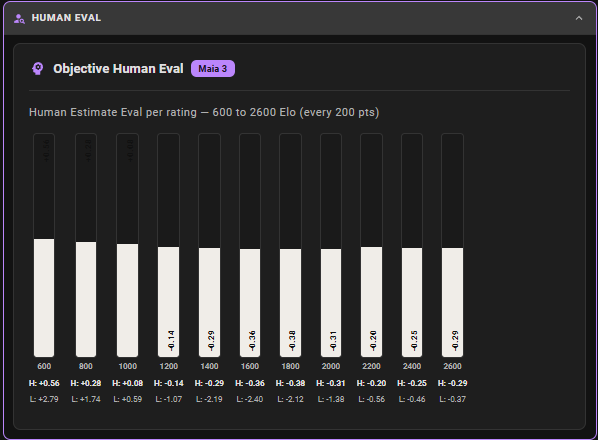
(In my GUI, I render all 600 to 2100 HEE eval bars that show estimate human eval based on Maia3 rating)
Integration Example (JavaScript) Code
Here's roughly what a minimal fetch call looks like in a browser app:
async function analyzePosition(fen, engine = "leela", rating = null) {
  const body = { endpoint: "analyze", fen, engine };
  if (rating !== null) body.rating = rating;

  const res = await fetch("https://www.chessagine.com/api/nn", {
    method: "POST",
    headers: { "Content-Type": "application/json" },
    body: JSON.stringify(body),
  });

  const data = await res.json();
  if (!data.success) throw new Error("Analysis failed");
  return data.data;
}

// Usage
const result = await analyzePosition(
  "rnbqkbnr/pppppppp/8/8/4P3/8/PPPP1PPP/RNBQKBNR b KQkq e3 0 1",
  "maia3",
  1500
);

console.log(result.topMoves);
// [{ move: "c5", probability: 0.418, percentage: "42%" }, ...]
Compare that to the ONNX + Web Worker approach: no model download, no worker setup, no WASM initialization, no message passing boilerplate. One fetch call.
Error Handling
The API returns standard HTTP status codes:
400— invalid FEN, unrecognized engine, missing/out-of-range rating for Maia, or missingendpointfield500— server-side error
// 400 example
{
  "error": "Validation failed",
  "details": ["Invalid FEN string", "engine must be one of: leela, elite-leela, maia3"]
}
The GUI: Agine
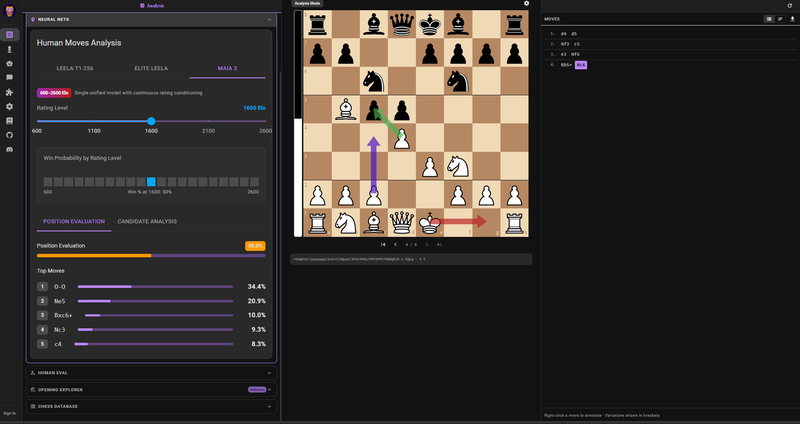
If you don't want to write API calls yourself, there's my open source GUI at chessagine, called Agine, that wraps NNEDB with a chessboard interface. You can paste or play to any position, select an engine, and see the move probability distribution overlaid on the board. The batch Maia view lets you scrub through rating levels interactively.
It's useful for exploring positions without writing any code, and it's how I prototype analysis ideas before integrating them into a tool. Below is a screenshot of it in action! See how arrows indicate the individual's net choice, the red is move for Maia3 2600, green is browser Stockfish, and the purple arrow is for Leela t1-256. For Maia3, there is an option to even change the rating dynamically; you don't need an account to use this, as it's querying my open NNEDB!
Wrapping Up
The ONNX-in-browser approach isn't going away, and it's the right choice for some use cases (offline-first apps, latency-sensitive local analysis). But for most web chess tools, game review, opening explorers, move probability overlays, and the download-and-worker overhead is a real UX tax that NNEDB removes entirely.
The database angle also means the API gets faster and more useful the more it gets used, which I find genuinely satisfying as a design property.
Full API docs are at the nnedb docs page. Would love to hear how people use it, what other nets would be useful to add, and any feedback on the response schema.
Thanks for reading, and I'm happy to answer any questions you have below! Or on ChessAgine Discord Community!
Noob
You may also like
 thibault
How I started building Lichess
I get this question sometimes. How did you decide to make a chess server? The truth is, I didn't. Noobmasterplayer123
Extended Ease Metric (2): Variation Ease
How easy is a given chess variation? Noobmasterplayer123
Human Estimate Eval Function
If a human or human-like model assessed this position, what centipawn score would reflect their perc… CM HGabor
How titled players lie to you
This post is a word of warning for the average club player. As the chess world is becoming increasin… Noobmasterplayer123