Training Openings with En Croissant
En Croissant is an app that lets you easily build and practice all of your openings.
Hey everyone! En Croissant is a free and open-source desktop app that gives you access to powerful local analysis, managing large databases, tactics training, and much more. You can read more about it on my last post.
Today I'm releasing a new version that includes a brand new opening trainer. Here's all you need to know to get started:
Building
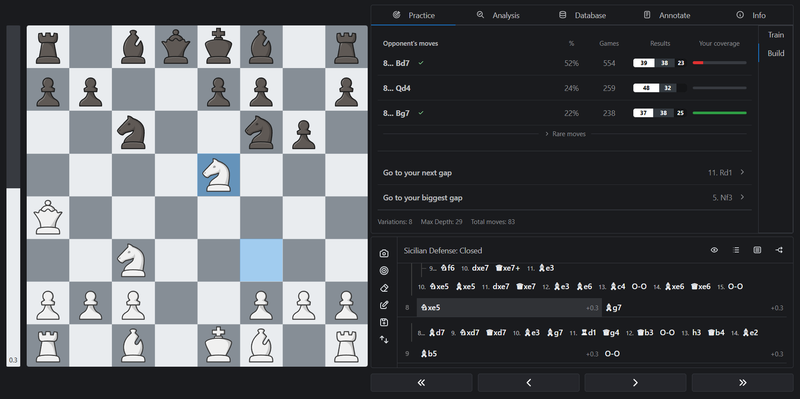
Before you can start practicing you have to build up the tree with the moves you wish to memorize. If you already have some studies on Lichess with your openings you can import a PGN and start from there. Otherwise, you can also start from scratch with the Build mode.
Build mode shows you the most common moves played from each position, sourced from the reference database, along with their win rates and your current coverage. This information helps you prioritize which lines to build out first. You can click on any move to add it to your repertoire.
You can also use the Go to your next gap and Go to your biggest gap buttons to quickly navigate to positions that need attention.
Training
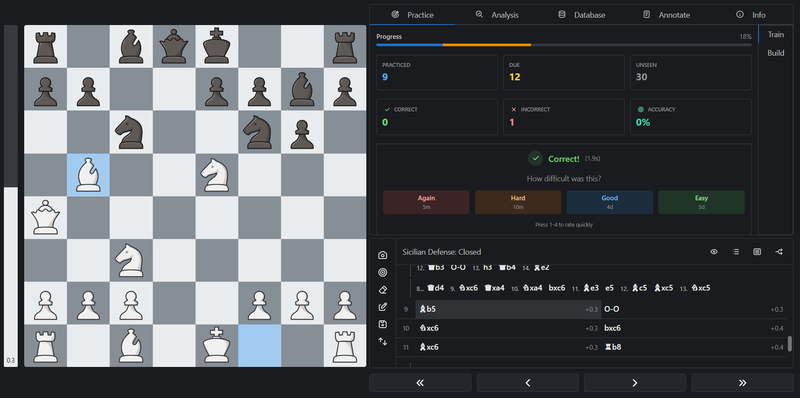
The app uses a spaced repetition algorithm to schedule your practice. Moves you struggle with come up more often. If you've used Anki for language learning or flashcards, the idea is exactly the same applied to chess openings.
Every time you open the app you'll be able to see which opening files have positions due to review, helping you manage your study of openings.
Here's some extra things:
- It handles transpositions cleanly so you don't have to prepare for the same line twice
- Everything runs locally, with no move limits or locked special features
- In the analysis panel you are able to run engines locally to validate the openings, with much stronger analysis than a browser is able to provide
En Croissant is available on Windows, macOS, and Linux. Download at encroissant.org.
Source code: github.com/franciscoBSalgueiro/en-croissant